
Loan schemes
Menu: Jewel Loan → Loan Lifecycle → Jewel Loan Scheme
A loan scheme holds the rules for your jewel loans: how much you lend, for how long, and at what interest. Set it up once and pick it for every new loan.
Add a scheme
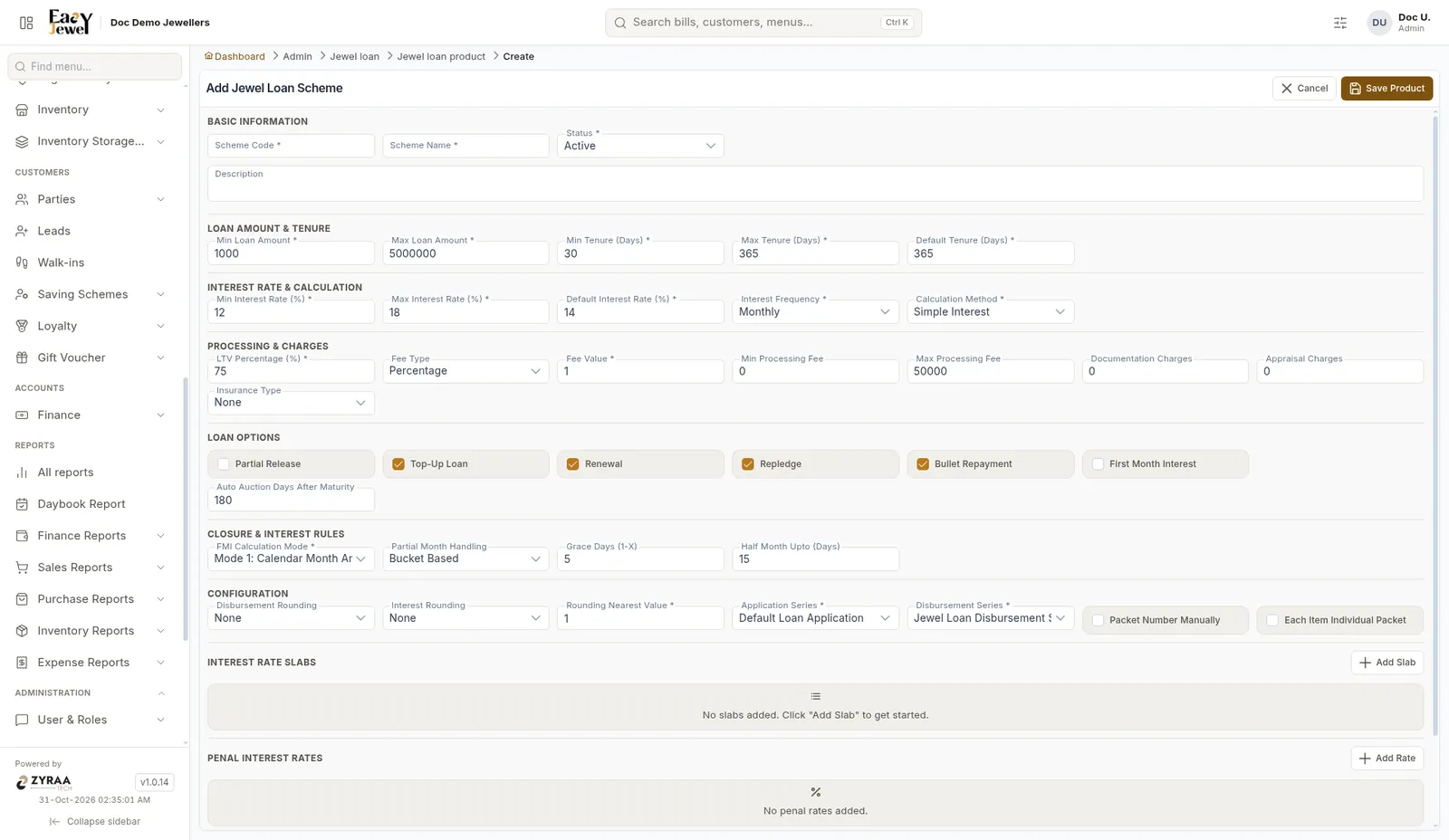
Click Add to open Add Jewel Loan Scheme.
Basic information
Scheme Code *, Scheme Name *, Status * (Active) and Description.
Loan amount and tenure
Interest rate
Processing and charges
Example: Kumar’s jewels are valued at ₹60,000. At 75% LTV he can get up to ₹45,000. A 1% processing fee on ₹45,000 is ₹450.
Loan options
Tick the options this scheme allows, such as Partial Release, Top-Up Loan, Repledge, Bullet Repayment and First Month Interest.
Interest rules
Configuration
Disbursement Rounding, Interest Rounding, Rounding Nearest Value * (1), Application Series * (Default Loan Application), Disbursement Series * (Jewel Loan Disbursement Series), Packet Number Manually and Each Item Individual Packet.
Interest rate slabs
Click Add Slab to add rate slabs.
Click Save Product to save the scheme.